
Encrypting a file system protects data stored on a disk, but the encryption algorithm is only part of the security. The system also needs a reliable way to generate, store, protect, and recover the encryption keys.
This is something developers can easily overlook. We enable disk encryption, confirm that files are encrypted, and assume the data is protected. But what happens when the server restarts? Where is the encryption key stored? Who can unlock it? And what happens if the key is lost or compromised?
These questions are part of key management. They determine whether encrypted storage actually provides the protection we expect.
How File System Encryption Works
File system encryption converts readable data, called plaintext, into encrypted data, called ciphertext. The operating system handles encryption and decryption, usually without requiring changes to the application.
For example, an application writes a customer record to an encrypted volume. The file system encrypts the data before it reaches persistent storage. When an authorized process reads the record, the operating system decrypts it and returns the original content.
The application normally does not need to know the encryption key.
There are different ways to implement storage encryption:
- Full Disk Encryption (FDE): Encrypts a disk or volume, including file contents and, depending on the implementation, file system metadata.
- File System Encryption: Encrypts individual files or directories, sometimes using different keys for different users or directories.
- Application-Level Encryption: Encrypts data inside the application before writing it to storage.
Examples include Windows Encrypting File System (EFS), BitLocker, Linux LUKS/dm-crypt, and Linux fscrypt. These technologies operate at different layers and should not be treated as identical.
The main difference is where encryption happens and how access to the encryption keys is controlled.
Understanding the Encryption Key Hierarchy
Most storage encryption systems do not directly protect every file using a password or a hardware security key. Instead, they use a hierarchy of keys.
A common design separates the key that encrypts the actual data from the key used to protect that encryption key.
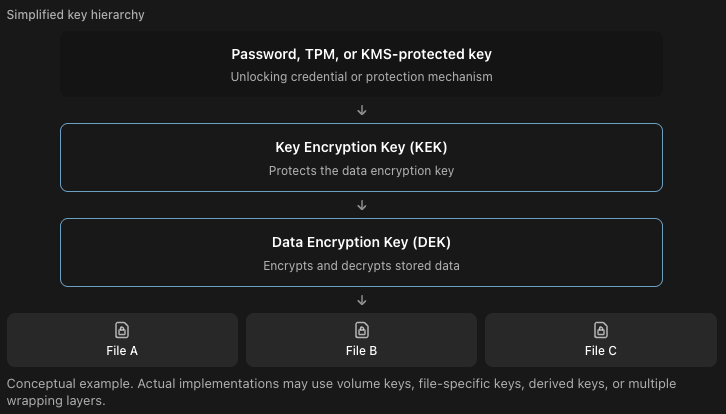
The DEK performs the actual data encryption. The KEK protects the DEK, often through a process called key wrapping.
Suppose a storage volume contains thousands of files. If the system needs to change the KEK, it may only need to wrap the existing DEK with a new KEK. It does not necessarily need to decrypt and encrypt every file again.
This separation makes key management more practical, especially when dealing with large volumes of data.
However, changing a KEK does not automatically replace a compromised DEK. If an attacker has obtained the actual data encryption key, rewrapping that same key will not protect data that the attacker can already decrypt.
How Windows EFS Protects Encryption Keys
Windows Encrypting File System provides a useful example of how encryption keys can be managed at the file level.
When a file is encrypted using EFS, Windows generates a symmetric File Encryption Key (FEK) to encrypt the file contents. The FEK is then protected using the authorized user’s EFS public key.
The user’s corresponding private key is needed to recover the FEK and decrypt the file.
This allows Windows to protect individual files while using public-key cryptography to manage access to their encryption keys.
EFS can also support Data Recovery Agents (DRAs), depending on the system configuration. A DRA provides an additional authorized recovery path if the original user’s key becomes unavailable.
One important detail is that EFS encryption is tied to cryptographic credentials, not simply the user’s Windows password. Resetting a password without preserving access to the necessary private key can create recovery problems.
For developers managing Windows environments, backing up EFS certificates and private keys is an important operational consideration.
EFS also differs from BitLocker. EFS protects selected files, while BitLocker protects volumes and typically uses mechanisms such as TPM-based key protection and recovery credentials.
Key Storage and Unlocking
An encrypted disk still needs a way to unlock its encryption keys when the system starts.
For a personal computer, this may involve a password, a TPM, or both. For a server, the design may involve a hardware security module (HSM), a key management service (KMS), or an external unlocking mechanism.
A Trusted Platform Module (TPM) can protect key material and release it under configured conditions, such as when expected boot measurements are satisfied.
A KMS provides centralized management of cryptographic keys and can enforce access policies, log key operations, and support key lifecycle processes.
These mechanisms solve different problems. A TPM is useful for protecting secrets on a particular device, while a KMS is useful when multiple systems need controlled access to centrally managed keys.
For example, consider a database server using encrypted storage. If the volume unlocks automatically during startup, the system must securely obtain the necessary key material. Storing an unprotected unlocking key on the same disk can weaken the protection, particularly if the key remains accessible to someone who steals or copies the disk.
The design should also consider availability. If the server depends on an external KMS and that service becomes unavailable, the server may be unable to unlock the volume after restarting.
Key protection and system recovery need to be designed together.
Key Rotation, Backup, and Recovery
NIST SP 800-57 provides guidance for managing cryptographic keys throughout their lifecycle, including generation, use, storage, recovery, and destruction. General+1
For storage encryption, three activities deserve particular attention.
Key rotation involves replacing a key according to security policy or after a suspected compromise. As discussed earlier, rotating a wrapping key is different from replacing the actual data encryption key. The correct approach depends on which key is affected.
Key backup ensures encrypted data remains recoverable if the original key storage becomes unavailable. NIST recommends retaining the keys needed to decrypt stored information for as long as that information must remain accessible.
Key destruction makes key material unavailable when it is no longer required. Securely destroying all usable copies of a key can make encrypted data permanently inaccessible, provided the encryption is properly implemented and no other recovery paths remain.
Consider a server that stores encrypted financial documents for seven years. Even if its encryption keys are rotated every year, older documents may still depend on previous keys. Removing those keys without checking which documents need them could make historical records unreadable.
This is why key retention must be aligned with data retention.
What Storage Encryption Does Not Protect
Storage encryption is mainly designed to protect data at rest. It is particularly useful when disks are stolen, storage devices are removed, or someone obtains an unauthorized copy of encrypted storage.
However, once an encrypted volume is unlocked, authorized processes can normally access its decrypted contents.
If an attacker compromises a running application with permission to read sensitive files, disk encryption alone may not prevent access. The operating system can decrypt the files on behalf of that application.
Encryption also does not automatically protect data in memory, application logs, temporary files outside the encrypted storage, or backups stored without equivalent protection.
NIST SP 800-111 discusses how different storage encryption technologies address different threats. The appropriate choice depends on the storage environment and the information being protected. NIST Computer Security Resource Center
For applications handling sensitive information, storage encryption should work alongside application authorization, access controls, secure backups, and appropriate monitoring.
Practical Considerations for Developers
When deploying applications on encrypted storage, I would pay particular attention to how encryption affects operations.
First, verify how the storage is unlocked after a restart. An encrypted server that cannot recover automatically during an outage may introduce availability problems. Automatic unlocking is convenient, but the credentials and trust conditions must be properly protected.
Second, test backup restoration, including recovery of the required encryption keys. A successful backup job does not guarantee that encrypted data can actually be restored.
Third, restrict access to recovery keys. Anyone who possesses the necessary recovery material may be able to decrypt the storage, even without the original user’s credentials.
Finally, understand which layer is responsible for encryption. If the requirement is to protect an entire disk against physical theft, full disk encryption may be appropriate. If different users need separate access to individual encrypted files, file-level encryption may be a better fit. If data must remain protected from storage administrators or other privileged infrastructure components, application-level encryption may be necessary.
There is no single encryption approach that covers every situation.
Conclusion
Encrypted file systems provide an effective way to protect stored data, but their security depends heavily on how encryption keys are managed.
Developers should understand where keys are generated, how they are protected, when they become available, and how encrypted data can be recovered if something goes wrong.
The most important point is that encryption and key management must be designed together. Strong encryption cannot compensate for exposed keys, missing recovery procedures, or poorly controlled access.